My Schedule has a new Weekly hours button. It shows each person the paid work they have done so far this week and what is still scheduled, day by day, counted from the shifts on their schedule. Nobody has to add up their own week, or ask a planner to do it for them.
What each person sees
Recorded so far: paid work from the shifts that have already finished.
Scheduled paid work: the planned work for the full week.
Unpaid time: breaks and other unpaid activities, shown apart from paid work instead of padding the total.
Hours by day: each day's recorded and scheduled hours side by side, so the long day in the week is easy to spot.
Counted the way planners count
Only published shifts count, so a draft on the board never turns into hours someone expects to work. Wherever a planner has entered actual times, those count instead of the planned ones. Next week's hours appear as soon as its shifts are published.
Nothing for planners to set up
Weekly hours reads the shifts, activities and actual times you already keep in Soon. Most planners are never on the schedule themselves, so the change is mostly one you will hear about from your team. If you are scheduled too, your own hours are in My Schedule like everyone else's.
Also in this release
On a phone, Weekly hours sits under More, and a one-time hint points to it the first time you open My Schedule.
The hours refresh when one of the week's shifts changes on the board, and again just after a shift ends.
Teams that work for clients can now filter the board, and the hours overview, by client.
Open My Schedule and choose Weekly hours. Available to everyone who is scheduled.
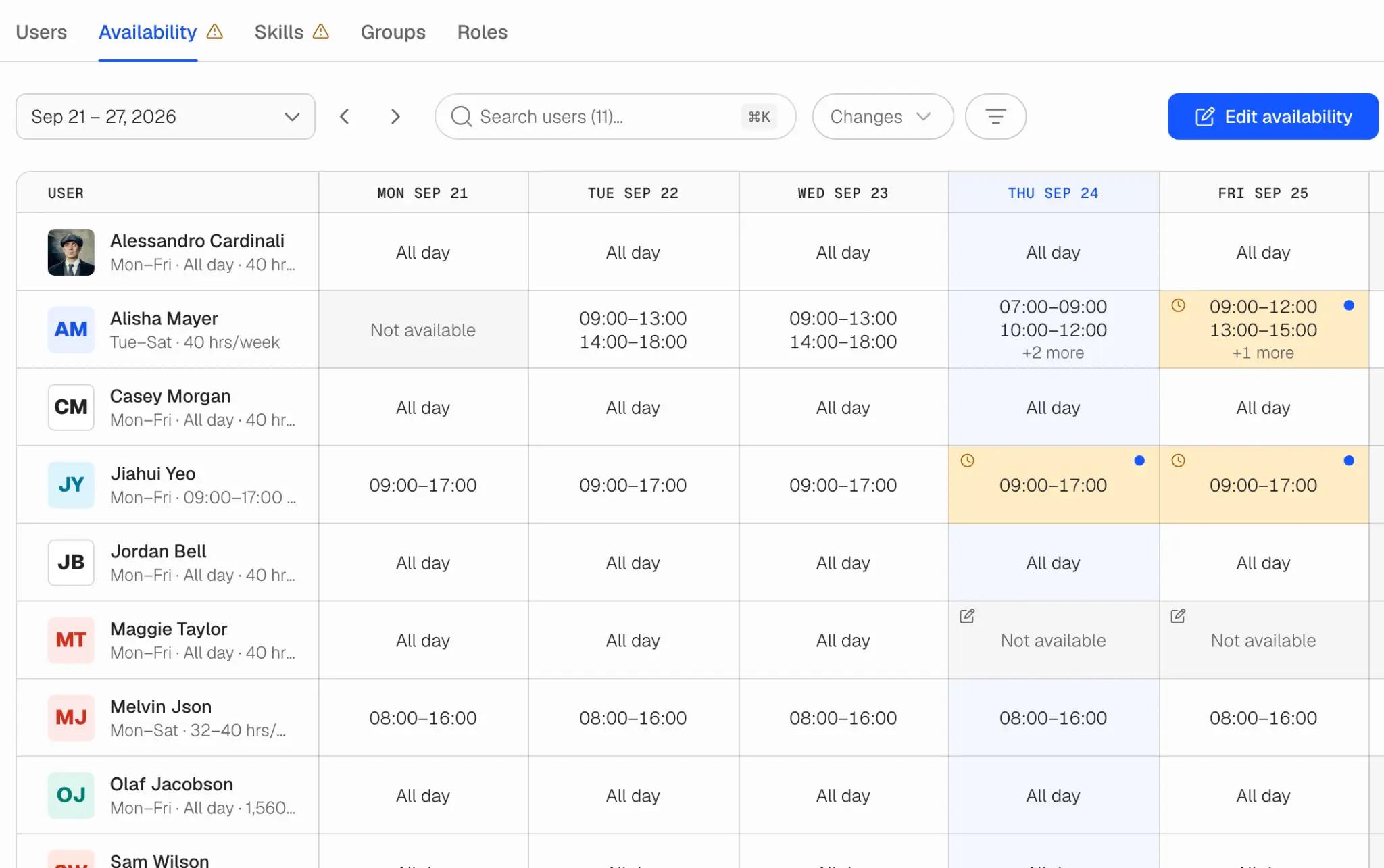
Availability now starts from each person's contract. Their working days and times are the starting point, so nobody has to fill in an ordinary week; they only change the dates that are different. Planners see the whole team in a new Availability tab in Team, and everyone else sets theirs in a refreshed My Schedule. Leave is separate and works as before.
One week for the whole team
Team › Availability shows each person's week next to the contract it comes from: All day, set hours, Not available, or Not set when nothing says when they can work. Changed days and pending requests are marked in the grid, and a total under each day counts the people and hours available. Open a day to see where its hours come from and everything that happened to it.
You choose how changes happen
In Availability settings each team picks one of three rules, with exceptions for individual people:
Colleagues request, a planner approves. The default. Each date waits for a planner, who can approve some days and decline others.
Colleagues set it themselves. Changes take effect as soon as they are saved.
Only planners change availability. For teams with agreed attendance. Colleagues see their availability but cannot send requests.
Settings also hold how much notice a change should give (changes with less are flagged Late, not refused), how far ahead people can enter availability, and whether the week starts on Monday or Sunday.
Preferences, without changing availability
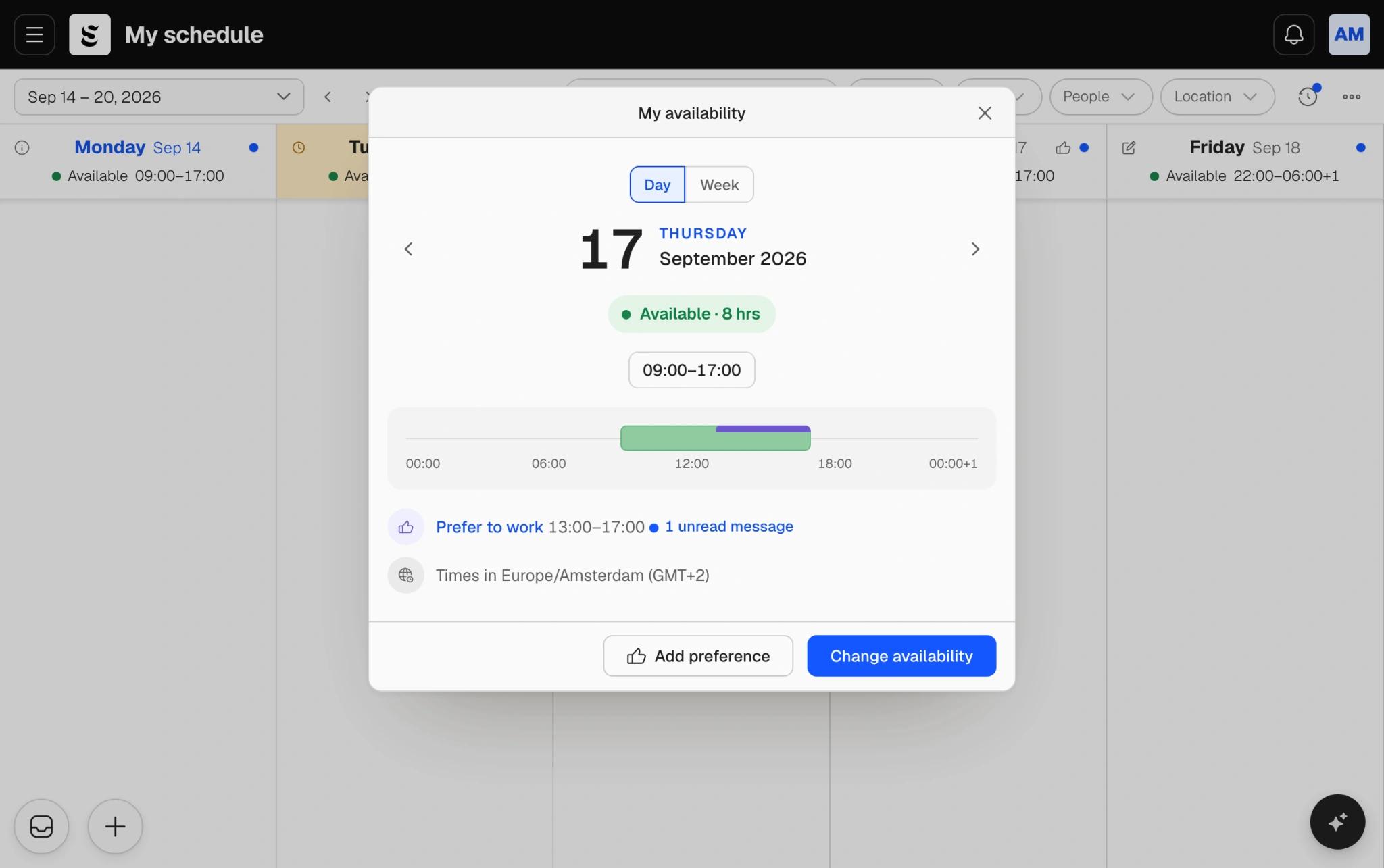
Someone can be available from 07:00 to 19:00 and still prefer mornings. Preferences say that: prefer to work, or prefer not to work, inside the hours a person is available. They save straight away, never need approval, and never change when someone can work. A team that does not want them can turn them off.
Requests you can talk through
Every request has its own messages, so the question and the answer sit next to the decision instead of in a chat thread. The Changes view lists what is waiting, soonest first, with the recent changes under it. Planners can edit the hours before approving, decide each day separately, or approve and decline several requests at once. The person is notified of the decision and reads any message on the request itself.
In My Schedule
My Schedule now opens with your availability across the top of the week. Pick a day, say the hours you can work or that you cannot, add a note, and send it. If your team asks for notice, Soon tells you before you send. Every change you make is listed with its status and the planner's reply, and you can edit or withdraw a request while it is still waiting.
When you plan
When you add people to a shift on a schedule board, the people picker reads the new availability and flags anyone the shift falls outside. Pending requests and preferences do not count as available.
What happened to availability you already had
The weekly default availability is replaced by the contract's working times, so check that each person's contract has them; anyone without them shows as Not set. Dates people had already entered for the days ahead were kept as preferences: an available date became a preference to work, and an unavailable date a preference not to work. If a date should be blocked outright, set it to Not available.
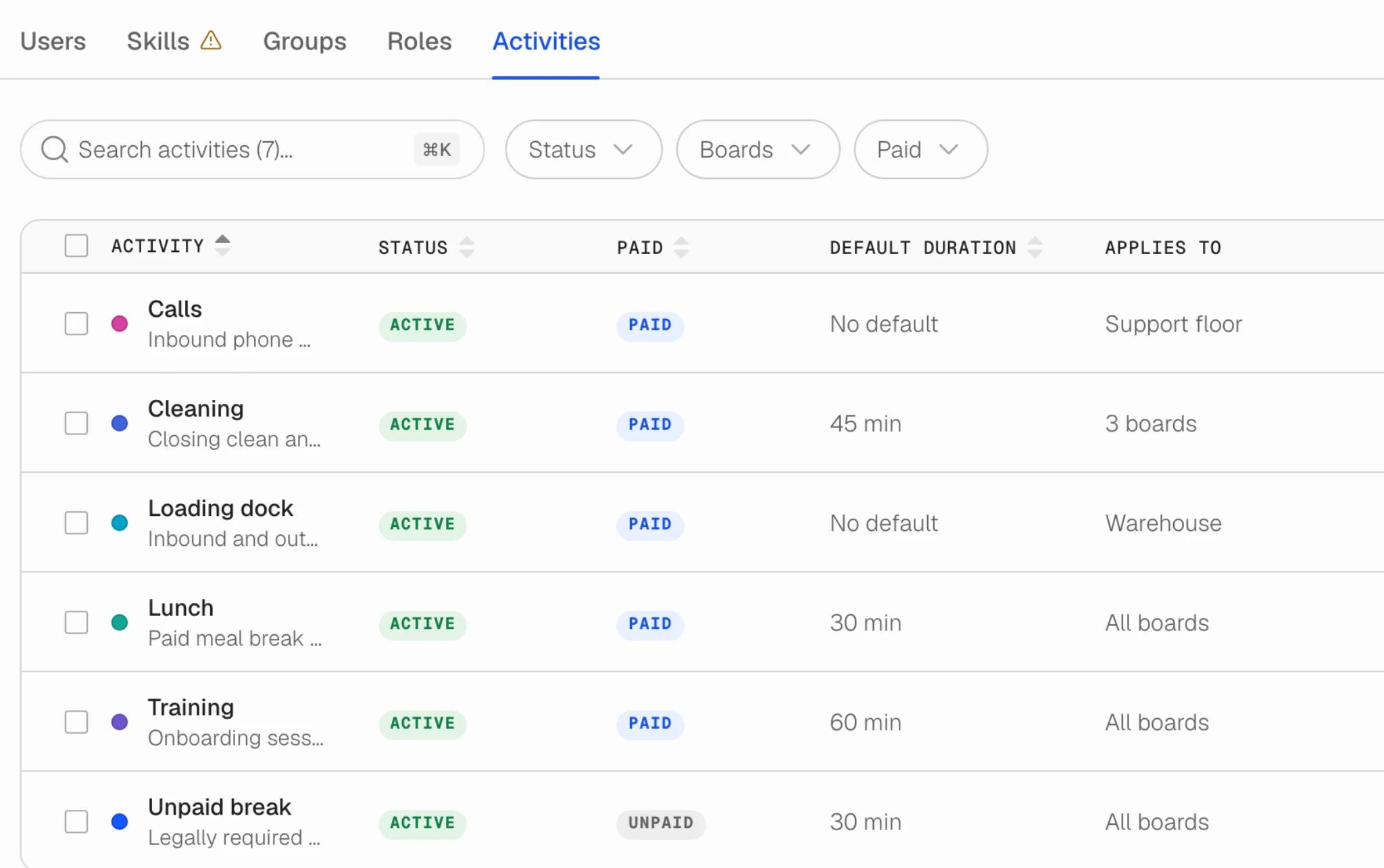
Team has a new Activities tab: one list for every activity your team runs during shifts, from breaks to calls. Set an activity up once and choose which boards it applies to, instead of creating it again on every board.
One list for the whole team
Until now an activity belonged to a board, so a team running five boards kept five copies of the same unpaid break, and correcting the duration meant correcting it five times. Now there is one "Unpaid break" for the whole team. Each activity carries its status, whether it is paid, a default duration and a colour, and the table searches and filters by status, boards and paid.
Applies to
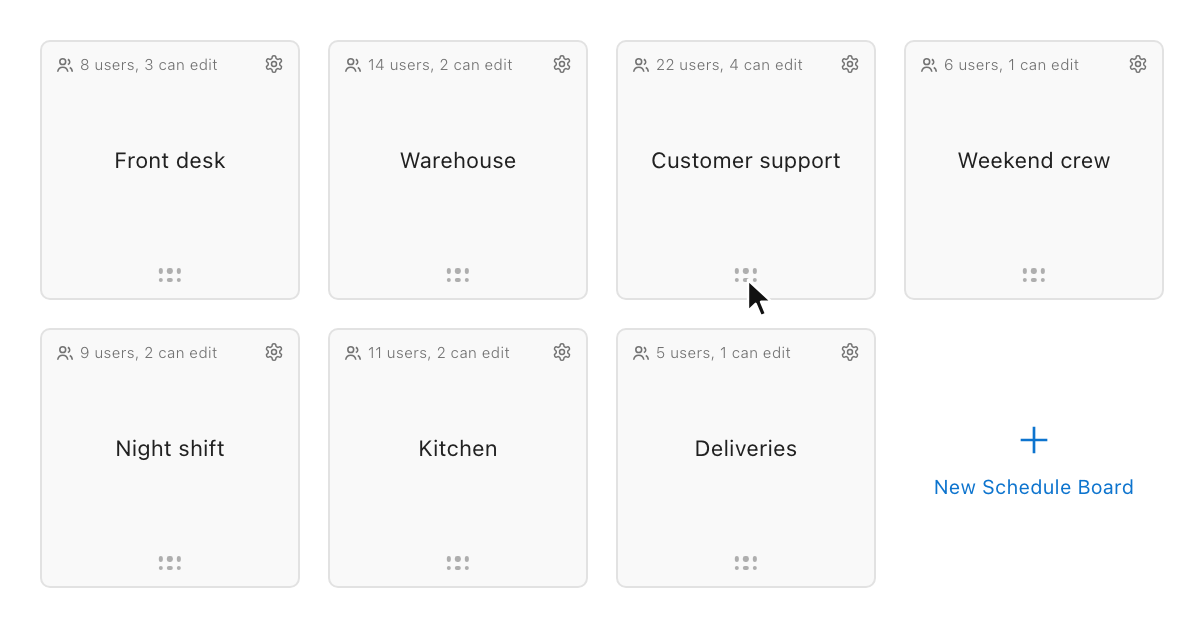
Every activity has an Applies to setting: all boards, or only the boards that need it, so a warehouse activity does not clutter the support floor. Roles work the same way now. A role used to apply everywhere; it can be limited to specific boards, and a board offers only the roles that belong on it when you assign someone.
Nothing to redo
Everything you already set up keeps working as before, on the same boards.
Also improved on the Team page
Groups and Roles can now be filtered by their members' roles and skills, so you can see which groups hold a given skill without opening each one.
The Users table renders only the rows in view, which keeps scrolling smooth on a large team, and keeps your place and keyboard focus as you go.
Tabs switch straight away and share one loading state, instead of each tab loading its own way.
Skills puts Status in the second column, in line with every other table in Team.
Fixes: the Groups tab showed English to everyone whatever their language, the "Last updated" column was cut off in German and French, and a click inside the Contract filter closed it instead of using it.
Open Team and go to the Activities tab, next to Users, Skills, Groups and Roles. Available to team owners and admins.
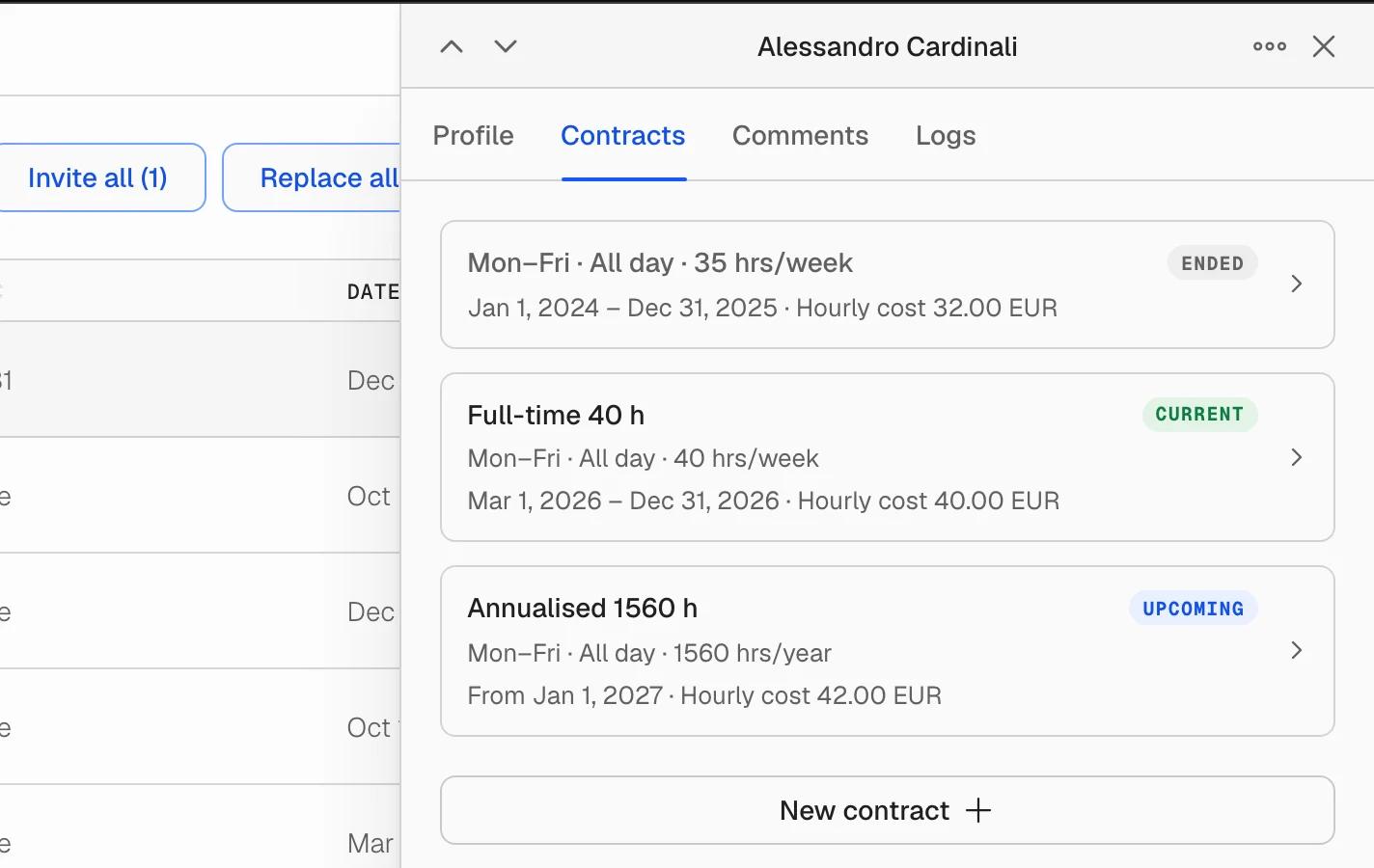
Open anyone in Team and you will find two new tabs. Contracts is where their working days, hours and hourly cost now live, each contract with its own dates, so nothing is lost when the terms change. Comments is where you and the other admins keep notes about that person.
Contracts that keep their history
A person's past, current and upcoming contracts sit in one timeline. Adding a new one does not overwrite the old: the previous terms stay readable with the dates they applied, which is what you need when someone asks what they were owed last quarter.
Working times per day, so a contract can say Monday to Thursday until 14:00 rather than a flat weekly number.
A daily minimum, for contracts that guarantee a person a certain number of hours each day they work.
Hours over a period: a week, a quarter, a year, or a rolling number of days.
A country, so the rules that apply to the contract follow where the person actually works.
Hourly cost, place of work and employee ID, held on the contract instead of scattered across the profile.
A heads-up before a contract ends
A contract that ends within 30 days is marked in the Users table, and the Ending soon filter narrows the list to just those people. Contract dates come through in the CSV export too.
Comments on each person
Comments is a thread on the person, for you and the other admins. Mention a colleague with @ to pull them in, spot unread threads from the badge on the row, and use the unread filter in the toolbar to find the ones still waiting on you. Long threads load in pages instead of all at once.
Also in this release
Save the terms you use often as a contract template, then apply it to anyone instead of retyping it.
Change contracts for many people in one pass with the bulk sweep.
Every panel now calls its history Logs, the same word everywhere.
The open tab is part of the address, so you can send a colleague a link that opens straight on someone's Contracts or Comments.
Open Team and choose a person. Available to team owners and admins.
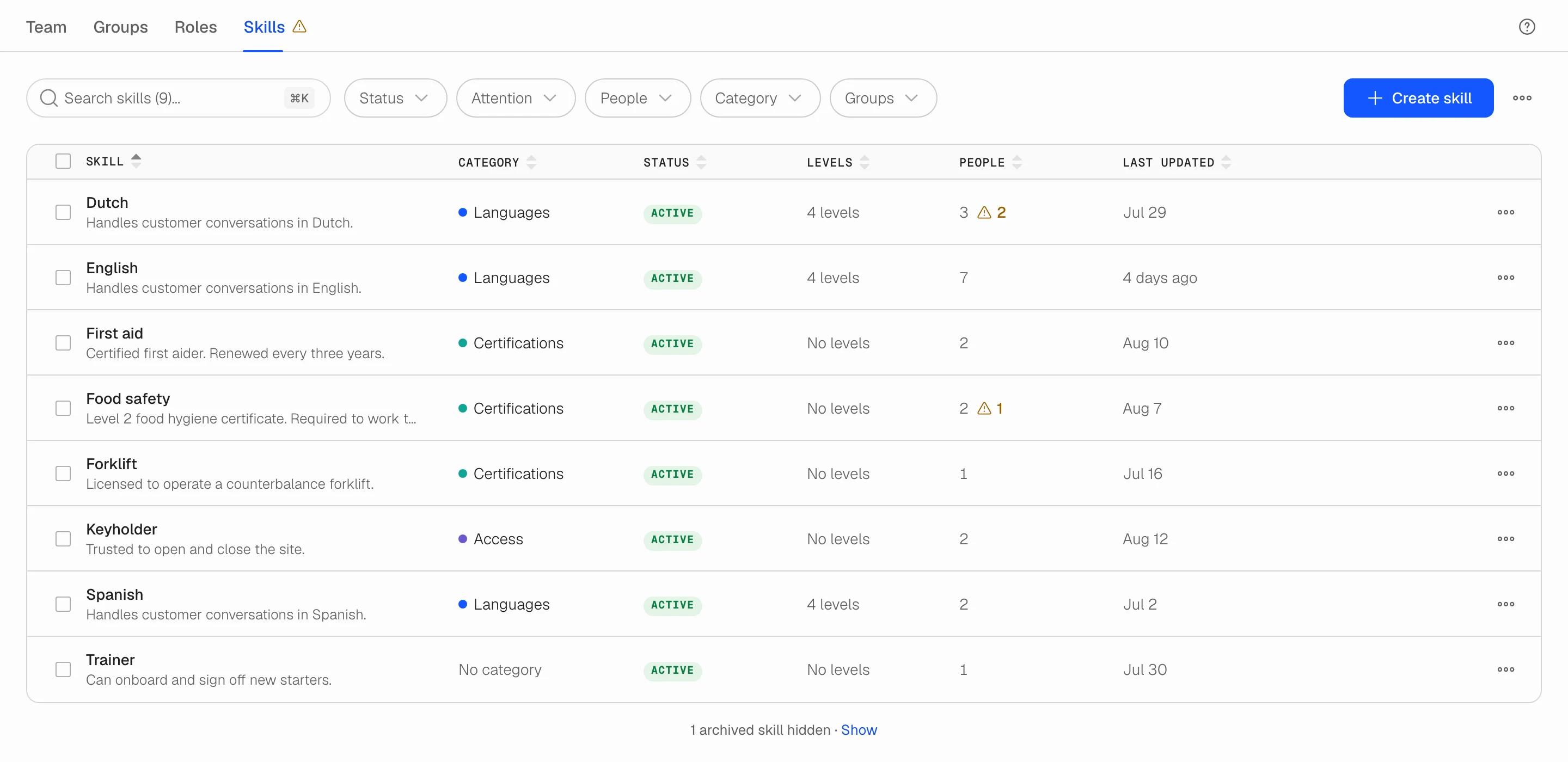
Users has a new Skills tab. Define the skills your work needs, record who holds them and at what level, and set when a certificate runs out. One place that stays current, instead of a spreadsheet.
What you can do
Create any skill your work needs: a licence, a language, a machine, a system. Give it a short code and an optional colour-coded category such as Languages or Certificates.
Add an ordered scale to skills that come in degrees (A2, B1, B2, C1). Skills people simply hold need no levels.
Record who holds each skill, at what level, and from when until when.
See at a glance what needs attention: an expired certificate, or someone added to a levelled skill who has not been given a level yet. The Attention filter narrows the table to just those.
Follow every change in the skill's activity log, and find people by skill on the Team tab.
Where to find it
Open Users and go to the Skills tab, next to Team, Groups and Roles. Available to team owners and admins.
Forecasting in Soon has been rebuilt from the ground up. It turns your demand history into staffing plans, so you always know how many people you need before you schedule.
Ten forecast models compete nightly; the best ones win.
See a safe staffing range, not a single guess.
Import CSVs safely: merge new data or replace history.
Tune business hours, models, outliers, and adjustments.
Feed staffing requirements straight into your schedule.
Redesigned forecast pages with scrubbing and comparisons.
Forecasts refresh automatically every night.
Read the full Forecasting in Soon guide in the Help Center to get started.
On July 6 and 7, we shipped improvements that make Soon Assistant more reliable, clearer, and safer when helping with scheduling work.
Soon Assistant improvements
Improved how Soon Assistant handles scheduling changes that need approval, especially time-change requests.
Time-change summaries now show clearer planned versus requested hours, paid time impact, and break changes.
Assistant approval cards are easier to review, with clearer labels and affected shift and member details.
Assistant now better understands the current board and week you are viewing, reducing confusion around relative requests like "this week."
Added stronger safeguards for ambiguous dates, such as numeric dates that could mean different days depending on date format.
Improved handling for interrupted or retried assistant actions, so approved actions are less likely to get stuck or duplicated.
Improved assistant recovery when approvals are submitted together with a follow-up message.
Scheduling and assignment updates
Added a safer way for Soon Assistant to remove a specific person from a shift.
When removing someone from a shift, Assistant now verifies the person, shift, assignment, and current status before making changes.
Published shift removals now follow the correct cancellation flow instead of being treated like draft assignment deletion.
Assistant now gives clearer guidance when an assignment cannot be removed, such as when it is already cancelled or when multiple matching assignments exist.
Users and provisioning
The Users page now reports SSO and SCIM provisioning settings separately.
This makes it easier for admins to understand whether single sign-on and directory provisioning are enabled independently.
Reliability and privacy
Improved assistant request handling, retry behavior, and duplicate-action protection.
Improved internal error reporting while reducing exposure of sensitive user content by default.
Added broader validation around assistant tools that affect multiple boards or scheduling areas.
Overall
These updates make Soon Assistant more precise when editing schedules, clearer when reviewing approvals, and safer around date interpretation, assignment removals, and repeated actions.
This release improves scheduling reliability across overnight shifts, date changes, daylight saving time, and actual working times. It also brings more dependable user management, clearer email confirmation, and better push notification troubleshooting.
Scheduling reliability
Scheduling is more reliable for overnight shifts, date changes, daylight saving time, and actual start and end times.
Activities now stay inside the correct shift window when events are edited, copied, duplicated, or created from templates.
Invalid activities are skipped or adjusted more gracefully instead of breaking event copy and template workflows.
Shift reminders and digest emails now use each person's actual working time more accurately.
Intraday updates now better prevent invalid activity times while still allowing non-time edits.
User management
User management now supports SSO visibility for team members.
Admins can manage user home addresses for proximity and scheduling workflows.
Email change confirmation has a clearer, localized confirmation flow.
Bulk user actions are more reliable, with clearer per-user errors for duplicates, mismatches, or invalid rows.
Invite emails no longer include personal notes.
Directory sync is more robust, including better handling for hidden or changed emails.
Notifications and polish
Push notification troubleshooting is clearer, with improved device status, reconnect options, and diagnostics.
The app now cleans up old service-worker registrations that could break push notifications or serve stale assets.
Several modals, callouts, drawers, buttons, selects, spinners, and mobile and table views received polish and consistency improvements.
Soon is getting a fresh new look, and this is the start. We have begun rolling out a cleaner typeface, a refreshed color palette, and a more consistent design, starting with the areas we rebuilt first.
Chief among them is the Users area, redesigned to make team management faster, calmer, and easier to trust. Team members, roles, and groups now live in a refreshed interface with better search, clearer actions, safer confirmations, and more helpful bulk editing. There is much more to come.
A fresh new look
A cleaner, more legible typeface in the areas we have refreshed so far.
A refreshed color system that is easier on the eyes, applied consistently to buttons, dialogs, dropdowns, filters, tabs, forms, and empty states.
This is just the beginning. We are bringing the new look to the rest of Soon over the coming releases.
New Users area
Manage Team, Roles, and Groups from a cleaner, redesigned workspace.
Select multiple people, roles, or groups and update them in one go.
Add people one at a time, paste a whole list straight from a spreadsheet, or invite by link.
See clearer explanations before deactivating, deleting, replacing, or changing someone's access.
Manage role and group assignments with better filters, search, activity history, and archive and restore flows.
Update working days, hourly cost, min and max hours, calendars, and board access from a more focused user profile panel.
Owners now get clearer confirmation flows for sensitive changes like ownership transfers and email changes.
Navigation and notifications
The main menu has been redesigned with clearer navigation, help options, and a new "What's new" area for product updates.
Notifications have a cleaner panel and simpler settings for choosing what reaches you and where.
The header and app layout have been polished for better loading states and better behavior on smaller screens.
Quality and polish
Many screens have improved mobile sizing and fewer layout issues.
Translation coverage has been expanded and tightened across the new Users experience, menus, scheduling, and notifications.
When you paste from a spreadsheet, Soon checks each row as you add it and flags issues clearly before you send invites.
You can now get real-time push notifications from Soon, on the web and as an installed app, for new, updated, and cancelled shifts, plus cover, cancel, and leave requests.
A single switch turns push on for your device. From there, pick exactly which updates you want, just like email.
One switch, your preferences: enable push per device, then choose per type what you are notified about.
No noise: when a batch of changes lands at once, you get one summary instead of a flurry.
Activity and shift-start reminders: opt in to a push before an activity or your whole shift starts, at the lead time you choose.
Always real time: notifications are never delayed.
Shift-start reminders are included in this release too. They give employees a heads-up before the whole shift begins and can be toggled independently from activity reminders.
Shift swapping has been improved. Team members can now swap between different shifts, not just trade within the same shift, making it easier to keep schedules covered.
Swap between shifts, not only within one shift.
Find available swap options more easily.
Deleted shifts now sync more reliably with calendars.
Soon Agent is now available. It brings natural-language scheduling into Soon, so managers can ask for changes from wherever they are working and stay in control before anything is applied.
Ask Soon from any page.
Type or speak scheduling requests in plain language.
Fill gaps, reassign shifts, apply templates, and publish weeks faster.
Built around one belief: you should see the product working before you invest real time in it.
Setting up a new tool used to mean doing the work first. Filling forms, configuring settings, inviting teammates, all before you knew whether the tool even fit your team.
So we flipped it. Tell us about your team, and in about two minutes Soon generates a real schedule, shaped by what you shared. Not a canned demo board. A starting point that already looks like your week, with demo teammates already in place. You explore, you judge, you decide. You’re the orchestrator. The product does the work.
The best way to know if a product fits your team isn’t to be told about it. It’s to see it working for you.
Planning with Soon now fits directly into the flow of work. With the new Slack integration, your team can check schedules, see what’s happening now, and manage reminders without switching tabs.
What’s new:
Access Soon directly from Slack with simple /soon commands
Instantly check your schedule and current activity
Manage reminder settings from inside Slack
Use the Soon App Home for a clearer overview and faster setup
Soon in Slack is designed to make planning feel lighter, faster, and closer to where your team already communicates.
Automated Activity Scheduler v2: intraday, baseline‑aware; Best effort/Must meet; new rules (duration filter, concurrency cap with fixed headcount, gap time); guardrails.
Improvement
Product Update modal redesign
“+ New Shift” primary action replaces “Create event”
Leave categories can now be set to private (Private Mode). Any leave associated with the category is now only visible to admins and the team owner, or the person who has requested the leave
Improvement
Improved design for leave modals on Board and MySchedule
Option to cancel events when creating/updating a Leave only shows up if there are actually overlapping events
Fix
Now showing multi-day leaves in different timezone correctly on MySchedule
Please look at our documentation for information on how to set this up for your team: https://news.intercom.com/soon/news/8669-introducing-enterprise-sso
Two-way Google Calendar integration
Connect your Google Account to Soon
Sync your events, activities and leave to your Google Calendar
Share your events in Google Calendar with Soon
Connect your Google Account to Soon
Sync your events, activities and leave to your Google Calendar
Share your events in Google Calendar with Soon
Improvement
The workload screen is now opened in Full Screen by default.
Improved validation to prevent activities overlapping or falling outside of request
Various minor improvements
We’ve updated our Privacy Policy (added compliance to Google API Service User Data Policy), Terms of Service, Cookie Statement, and GDPR to improve organization, add clarity, and increase transparency regarding our current policies, procedures, and offerings. We have also updated our company structure and now serve you from a new entity named Soon Technologies B.V. You should carefully read the full update. By continuing to use the Soon Services, you agree to the updated policies. If you have questions, please contact us at [email protected].
It is now possible to give an Admin "read-only" rights on a board by setting them to Can View in the Board Settings. This is only possible if the Admin is not the team owner or the board owner.
We've added the ability to remove a Deleted User from an Event. When you remove the user, the user will not be counted anymore in the stats of the Event, nor will the user be visible in the request list.
Durations in the day/week/month views now also include breaks
A new View Setting has arrived! You can now decide on a team level which week should be shown by default on the boards and schedules of your team. This is useful for when you don't work with day-to-day schedules, but more event-based.
Be aware that changing the default will affect all users in your team. By default the setting is on Today, which doesn't change how things work right now, and is best for most teams.
It is now possible to hide users on a board who only have view access. You can change this per user in the settings of your board(s). This is useful when you want another planner to be able to view your board, but don't want to see their leaves on the board, or see them in the people selector.
Maybe you wonder what that means. Open Groups is a new feature that makes it possible to open a specific group for Board members. So you do not have to invite these members individually.
You can activate an Open Group by means of a switch on the group. After the publication, the Event of which this group is part will automatically appear on the Schedules of the right Board members.
Who are the right Board Members?
the Member is part of the relevant Board
the Member has the role assigned to the group, or there is no role
the Member is not already present at the Event
the Member has not previously accepted an Open Event on that day
This last point depends on a new setting. You can indicate for yourself how many Open Events a User can accept in 1 day. The default is unlimited.
Open Groups can simply be part of your regular Events and therefore do not have to be created specifically. In addition, limits can also be set on Open Groups. If you want a maximum of 10 people to accept, you can indicate this just like in regular groups. After the 10th person has accepted the Event will disappear on the Schedules of the other Members.
With Open Groups you can easily set up Events where you do not have a specific preference who comes, if only people come up with the right role. Or use the Open Groups to set up a staff outing. We are very curious what you think of it and how you will use it.
The people picker now has access to data from across boards. That means if a person has an event on another board you will see it reflected in the picker.
We have also implemented various cache fixes, which will result in a better overall experience.
It is now possible to download a .csv file of your leave data. Administrators can filter and download the leaves of their entire team, while members can filter and download their own leaves.
We're happy to announce the Day View. If you're on the plan board, you can now click on one of the seven days of the week to open it. We hope you enjoy the overview it gives you!
The filters on the schedule board now show all people and roles on a board. Changing weeks also keeps your filters on in this new version, which makes for an easy overview of what's happening. The design also has slight updates.
With the launch of V2.9.1 it is now possible to set & change time zones for events. It is also possible now to set a time zone for all availability. This time zone can be separate from your display time zone; perfect for when you're travelling.