Track your team's skills in one place.
Skills are whatever your work needs them to be: a licence, a language, a machine, a system. Define them once, record who holds them and at what level, and set when a certificate runs out.
Start Free Trial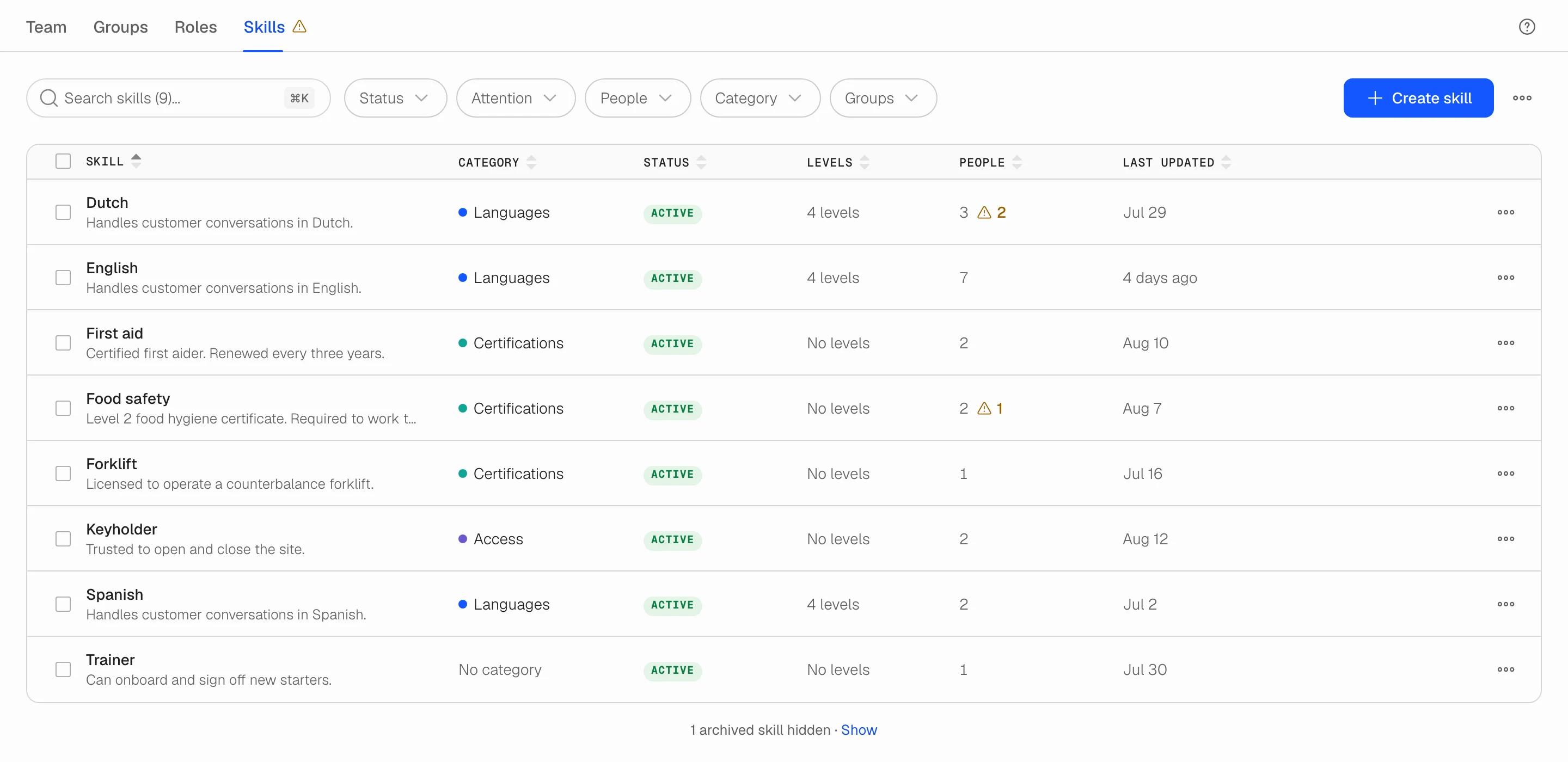
A record that stays current
Any skill your work needs
A first aid certificate, French at B2, a forklift licence, the till system. Create the skill, give it a two-character code and, if you like, a colour-coded category such as Languages or Certificates. Nothing is predefined; the catalogue is yours.
Levels for skills that come in degrees
Give a language or a system an ordered scale (A2, B1, B2, C1) and record each person at their level. Skills people simply hold, such as a licence, need no scale. Rename a level and everyone on it moves with it; remove one and Soon tells you who is affected before you save.
Expiry dates that flag, not delete
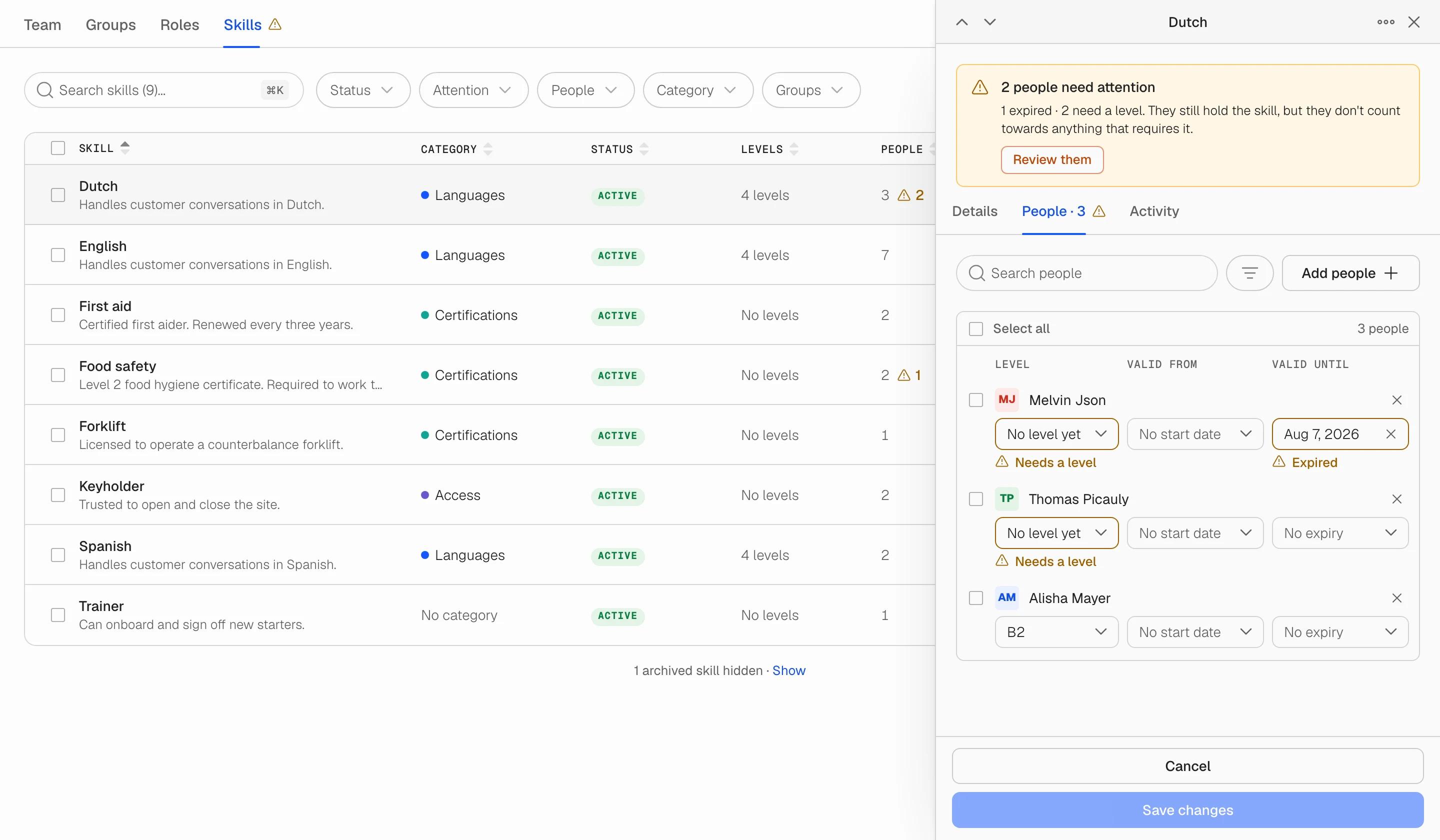
Set valid-from and valid-until dates per person. When a certificate lapses the person still holds the skill; it just no longer counts as valid, and an amber mark shows you where. Renewing is editing one date.
Know what needs attention from across the room
An expired certificate or a person added to a levelled skill without a level puts a mark on the Skills tab itself, on the skill's row and on the person. The Attention filter shows only what needs a decision; fixing the field clears it straight away.
Every change on the record
Who created the skill, who was added, whose level changed, when a certificate was renewed, who archived it. Each skill has an activity log, and each person's own history shows the skills they gained and lost.
Find people by skill
Filter the Team directory by skill to see who has been trained. Export the catalogue to CSV when someone outside Soon needs the list.
The Skills tab, under Users
One row per skill: category, status, levels and how many people hold it. Open a row for the full record: details, people and activity.
Skills sits next to Team, Groups and Roles under Users. Available to owners and admins on every plan.
How it fits with the rest of Soon
Skills qualify; roles and shifts do the work
A shift role is the job on a shift (Shift leader, Cashier, Agent). A skill is a qualification a person holds. Roles say what the shift is; skills say what a person is qualified for. Keeping the two apart keeps both lists short and honest.
Not a group, not an access role
Groups bucket people by department or location. Access roles (owner, admin, member) control what someone can do in Soon. Skills describe what someone can do on the floor, with a level and a date.
Start from the spreadsheet you already have
Create the skills, add people in bulk, then grade and date them at your own pace. Anyone you have not graded yet shows as Needs a level rather than being quietly given one, so the record never says more than you know.
Replace the skills spreadsheet
Create a team, open Users, and add your first skill in a minute.
Start freeFrequently asked questions
Who can manage skills?
Team owners and admins. They create skills, add people, set levels and validity dates, and archive or delete skills. Members do not see the Skills tab. Skills is available on every plan.
What happens when a certificate expires?
Nothing is removed. The person still holds the skill, their row shows Expired with the date, and the skill carries an attention mark until the date is renewed. Filtering the Team tab by that skill still finds them, because the filter answers who has been trained.
Do I have to define levels?
No. Most skills have none: someone either holds a forklift licence or does not. Add a scale only for skills that come in degrees, such as languages. A scale holds up to eight levels.
What is the difference between archiving and deleting a skill?
Archiving hides the skill from the active list while everyone keeps their record, and it can be restored at any time. Deleting removes the skill from every person, with their levels and dates, and cannot be undone. Soon shows you how many people are affected before you confirm.
Can I organise skills into categories?
Yes. Create categories such as Languages, Certificates or Machines, each with its own colour, straight from the category picker. Deleting a category never deletes its skills; they just become uncategorised.
Your next schedule could take 2 minutes.
Import your team, set your rules, hit auto-fill. Most teams are live the same day.
30 days free · No credit card required
Already have an account?Sign in