BPO Scheduling: Staffing Multiple Clients Without Double Counting
How BPOs staff several clients without double counting: dedicated vs shared agents, service levels, shrinkage and forecasting per client, and reporting that reconciles with the schedule.
Key takeaways
- Assign every agent hour to exactly one client; never add a shared pool to each client's capacity.
- Plan each client's requirement first, then fill it from dedicated agents and then the shared pool.
- Apply shared shrinkage at agent or site level and client-specific shrinkage only to that client, each once.
- Forecast each client and channel separately and combine only when planning the shared pool.
- Report per client in a way that reconciles with the schedule, including client switches during the day.
A BPO or outsourced contact center rarely staffs one queue. It staffs several clients, each with its own contract, service level, hours, and reporting. The most common planning error in that setup is double counting: the same agent hour is promised to two clients, or shrinkage is subtracted once in the pooled plan and again in each client plan. This guide shows how to staff multiple clients so every hour is counted exactly once.
Dedicated vs shared agents
The first decision is which agents belong to which client.
- Dedicated agents work for one client only. Planning is simple: each client is its own queue with its own forecast, staffing requirement, and schedule. Contracts often require it for compliance, product knowledge, or data access reasons.
- Shared (blended) agents are trained on two or more clients and can be assigned to whichever needs them. Pooling improves efficiency, because a larger pool absorbs random peaks better than several small ones, but it makes attribution harder.
Most BPOs end up with a mix: a dedicated core per client and a shared pool that covers peaks, absence, and out-of-hours work.
How to avoid double counting shared agents
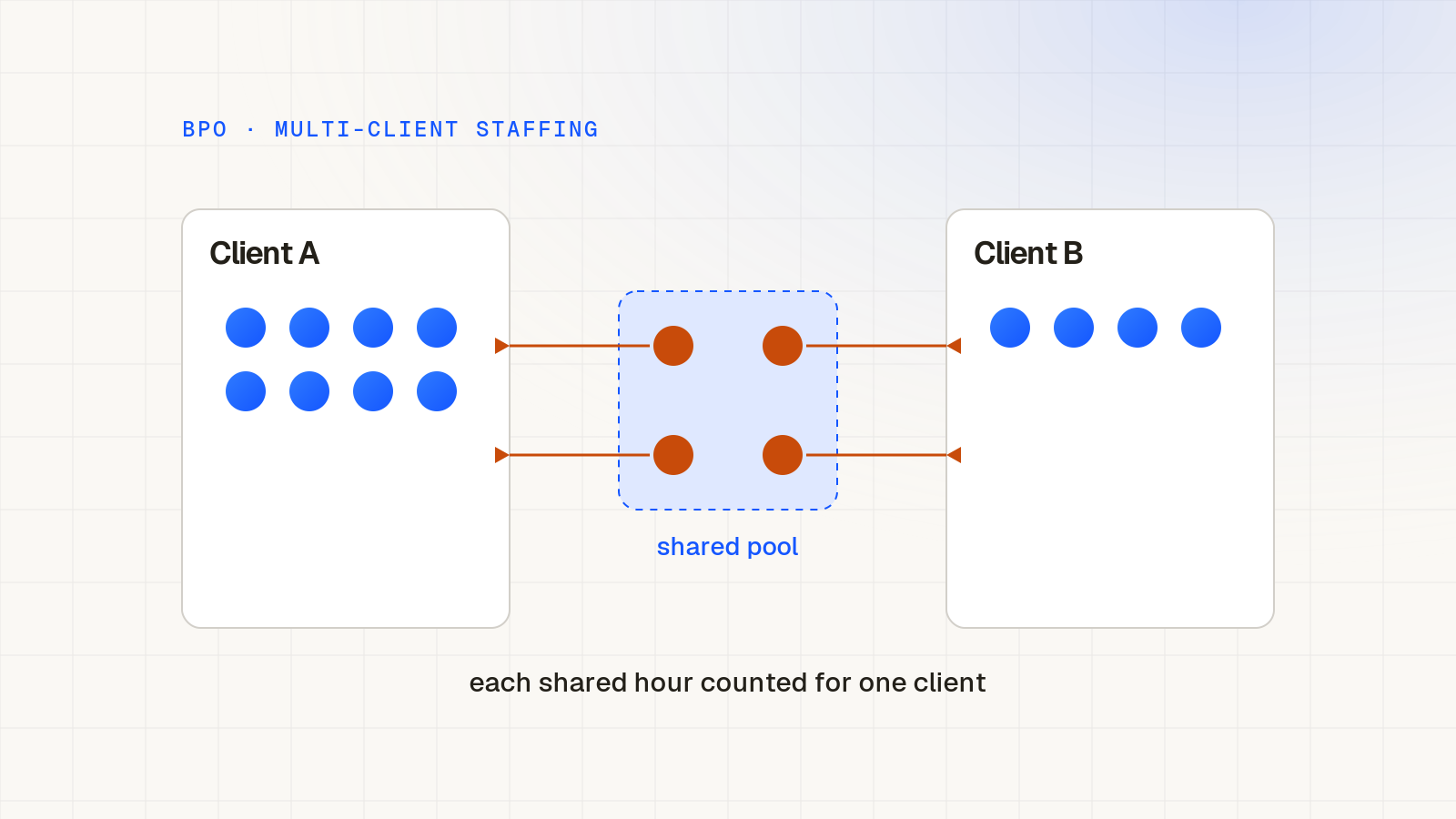
- Assign every shared agent hour to one client at a time in the schedule, even if the agent can serve several. An hour that is assigned to client A cannot count toward client B's staffing.
- Plan the requirement per client first, then fill it from the dedicated team and then from the shared pool. Do not add the shared pool to each client's available capacity.
- When an agent switches client during the day, split the hours at the switch, so reporting and billing match the schedule.
Service levels per client
Each client contract usually defines its own target, for example a percentage of contacts answered within a threshold, a maximum response time for email, or a resolution window for tickets. Staff each client to its own target.
- Calculate the requirement per client and per interval with an Erlang calculator for live channels, using that client's volume, handle time, and threshold.
- For email and tickets, plan to a backlog or response-time target instead of a queueing formula.
- If shared agents serve several clients, decide in advance which client has priority when both queues are under pressure, and write it down. Otherwise priority is decided by whoever shouts loudest on the day.
Shrinkage per client
Shrinkage differs between clients more than many BPOs assume. One client may require weekly compliance training, another long onboarding for new product releases, a third extra quality calibration sessions.
- Keep shared shrinkage (leave, sickness, breaks) at the agent or site level.
- Add client-specific shrinkage (client training, calibration, client meetings) only to the client that causes it.
- Apply each client's shrinkage once, when converting its productive requirement into scheduled hours. Do not also subtract a site-wide percentage from the same hours.
The contact center shrinkage calculator helps you turn a productive requirement into scheduled headcount per client.
Forecasting per client
Forecast each client separately. Clients have different seasonality, campaigns, and hours, and a combined forecast hides exactly the patterns you need. A retail client may peak in late November while a utilities client peaks after billing runs.
- Keep separate history per client and per channel.
- Ask clients for their marketing calendar, launches, and billing dates, and add them as events.
- Track forecast accuracy per client, because each client will ask about its own numbers.
- Add the client forecasts together only when planning the shared pool.
Reporting per client
Clients pay for their hours and judge you on their service level. Reporting must therefore be per client, and it must reconcile with the schedule.
- Scheduled versus required hours per client and interval.
- Hours delivered by dedicated versus shared agents.
- Service level and backlog per client.
- Client-specific shrinkage, such as training hours, that may be billable.
If the numbers in the client report do not match the hours in the schedule, the usual cause is a shared agent counted for two clients, or switches during the day that were never recorded.
A worked example of double counting
Take a hypothetical site with two clients. Client A needs 20 productive agents in the 10:00 interval and client B needs 10. The site has 18 agents dedicated to A, 8 dedicated to B, and a shared pool of 6 agents trained on both.
A common mistake is to tell client A that it has 18 plus 6, which is 24 available agents, and to tell client B that it has 8 plus 6, which is 14. On paper both clients are covered. In reality the same 6 shared agents are being counted twice, and the site has 32 agents for a combined requirement of 30 before any shrinkage.
Counted once, the shared pool first fills A's gap of 2 and B's gap of 2, leaving 2 shared agents spare. Now apply shrinkage once, per client, and it becomes clear whether the 2 spare agents are enough to absorb sickness and breaks or whether the site is short. The arithmetic is simple. The discipline is in assigning each hour to one client before reporting.
Hours, time zones, and contract windows
Clients rarely share the same opening hours. One may need cover from 07:00 to 22:00 on weekdays, another 24/7 in a different time zone, a third only during business hours with an email backlog target overnight.
- Plan each client's requirement in the time zone of its customers, then convert to the site's local time for scheduling.
- Mark contractual hours explicitly, so shared agents are not assigned to a client outside its window.
- Use the overlap between client windows to place shared agents, coaching, and training.
- For overnight or weekend cover, decide whether a shared pool covers several clients or whether each client needs its own minimum staffing.
Contracts, billing, and what to agree up front
Many staffing disputes between a BPO and its clients come from definitions, not from performance. Agree the following before go-live and write them into the statement of work or operating manual:
- What counts as a productive hour, and whether client-specific training and calibration are billable.
- How shared agent hours are attributed and billed when an agent works for two clients in a day.
- Which service-level definition applies, including the threshold and whether abandoned contacts count.
- How forecast inputs are shared, and how far in advance the client must announce campaigns and launches.
- What happens when the client's actual volume is far above the forecast it provided.
Common mistakes in multi-client staffing
- Adding the shared pool to every client's capacity.
- Subtracting a site-wide shrinkage percentage and then client shrinkage again on top.
- Forecasting all clients together and splitting the total by a fixed ratio.
- Letting the loudest client take shared agents during the day without an agreed priority rule.
- Not recording client switches during the day, so reports cannot be reconciled with the schedule.
A simple weekly planning routine
- Update the forecast for each client and channel.
- Calculate the productive requirement per client per interval.
- Add client-specific shrinkage, then shared shrinkage, once.
- Schedule dedicated agents first, then fill gaps from the shared pool, assigning each hour to one client.
- Publish schedules and record client switches during the day.
- Report per client and compare delivered hours with plan.
How Soon supports BPO and multi-client teams
Soon supports BPO and multi-client operations as part of the standard product, not as a separate module. You can organize schedules around different groups, roles, activities, and operating windows, for example one group per client, and plan each client queue's demand while managers keep one view of required and scheduled coverage across the whole operation. Forecasting is available on the Scale plan. Integrations with contact center platforms are available on request. Most teams go live the same day, and larger operations within a week. Trials run for 14, 30, or 60 days depending on the plan. See how it fits contact center and BPO workforce management.
Industry
Contact center and BPO workforce management
Forecast, staff and schedule each client queue with one view of coverage.
Explore