Skip to content
Solutions

How to set staffing requirements for a work schedule

Define the work that needs coverage, set the required number of people for each time range, add the skills that make someone eligible, and select a manual or forecast source. Then compare required and scheduled staffing at the same interval before you publish the plan.

  • Work: role, activity, or workstream
  • Time: the exact operating interval
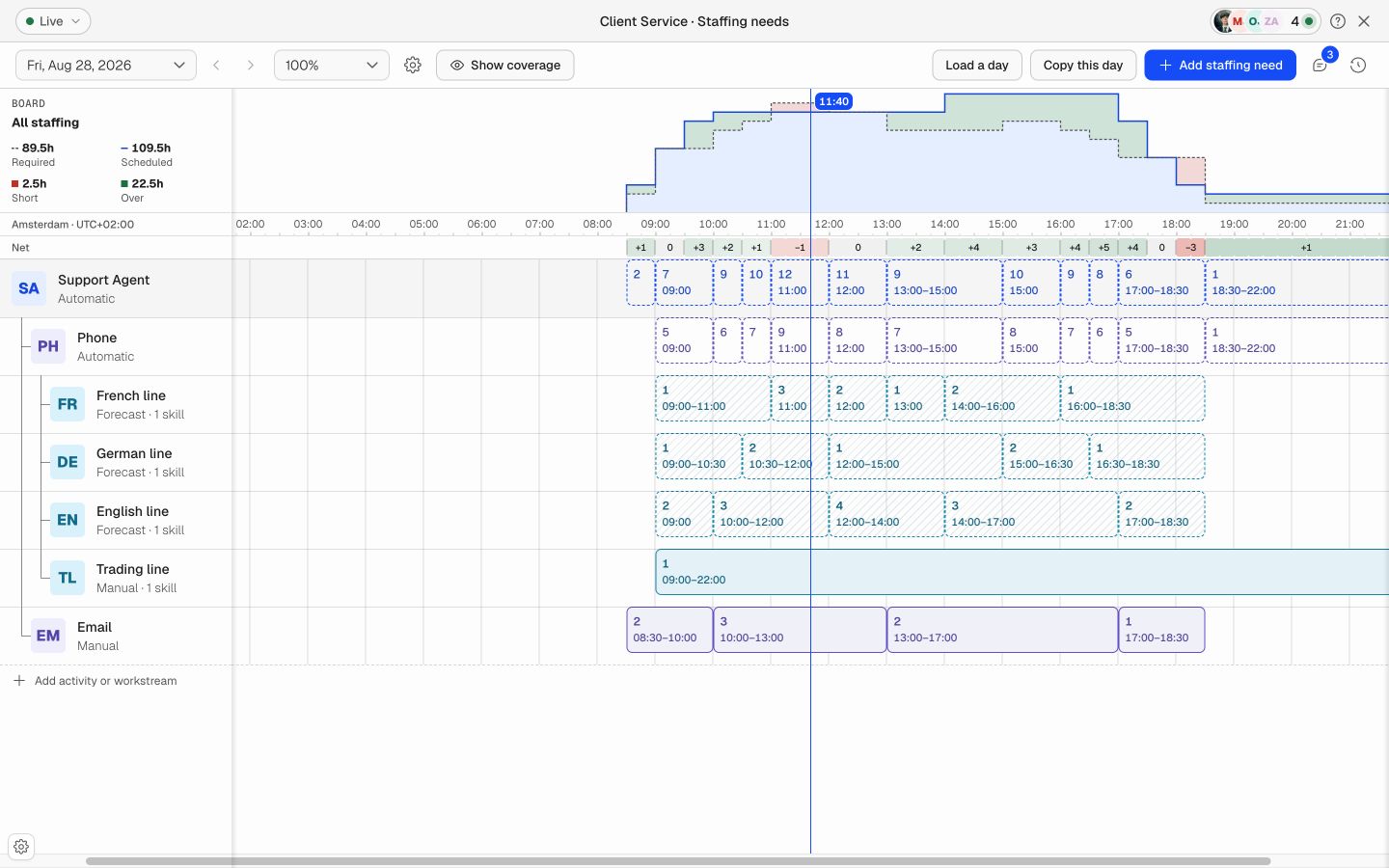
Soon staffing requirements timeline with roles, activities, workstreams, required FTE, and coverage totals
You might have asked

“We know the schedule, but we have not written down the need behind it.”

“We need different staffing levels through the day.”

“Headcount looks fine, but the right skills are missing.”

What this usually means

Start with four facts

A useful staffing requirement answers four questions: what work needs coverage, when it needs coverage, how many people are required, and what makes a person qualified to count. Keep those facts separate from the names of employees. Requirements describe the need; the schedule assigns people to meet it.

Use the same time interval for the requirement and the coverage check. If demand changes every 15 minutes, a daily or shift-wide average will hide the exact periods that need action.

Work: role, activity, or workstream

Time: the exact operating interval

People: required FTE or headcount

Eligibility: skills and minimum levels
Read this next

1. Put the requirement at the right level

Start at the level where the staffing decision has meaning. Use a role when the main question is who must be present. Add an activity when the role covers different work during the day. Add a workstream when one activity has separate queues, languages, locations, customers, or demand sources.

Do not enter the same requirement at every level. Let the work below roll up into the parent where possible. Add a parent-level value only when the complete role or activity needs more coverage than its children explain.

What to fix

2. Set the required people and time ranges

Enter the number of people needed for each period where the requirement stays constant. A support queue can need two people from 08:30 to 09:00, seven from 09:00 to 10:00, and twelve during the midday peak. The time blocks should follow real operating changes, not arbitrary calendar boundaries.

Use FTE when partial capacity must be represented

Use exact time ranges instead of one daily average

Keep zero demand distinct from missing data

Split a requirement at board midnight

Review the peak as well as the daily total

What to fix

3. Add the skills that qualify coverage

Headcount and qualified coverage are different facts. Add a skill only when a person must hold it to perform the work. Include a minimum level when proficiency matters, such as French at B2, a current clinical qualification, or authorization for a machine or system.

A skill filters who can satisfy a requirement. It does not add more people by itself. If ten agents are required and three of those ten must speak French, model the French need as qualified coverage inside the same operating demand, not as thirteen people.

Use current skills records as the eligibility source

Include levels only when the operation uses them

Keep expired qualifications out of eligible coverage

Check the qualified pool before the schedule is published

What this usually means

4. Select a manual or forecast source

Use manual requirements for fixed posts, opening hours, known routines, regulatory cover, and planned work that a manager can state directly. Copy a proven day or pattern when the same need repeats, then adjust the exceptions.

Use forecast requirements when demand changes from historical volume, queue arrivals, orders, tickets, visits, or another demand signal. Keep the forecast assumptions visible and apply manual adjustments only when a known event is not already represented in the data.

Manual: fixed or planner-authored demand

Forecast: calculated interval demand

Derived: totals from child work

Adjustment: a documented exception to the source

What to fix

5. Compare required and scheduled staffing

Compare the schedule with the requirement at the same interval and scope. Required is the target. Scheduled is the qualified capacity assigned to that work. Net is scheduled minus required. A negative result is short, zero is covered, and a positive result is over.

Keep shortages and surplus periods separate. Three extra people at 15:00 do not repair a three-person shortage at 11:00. Daily FTE-hour totals are useful summaries, but the interval view tells the planner when to act.

Check the complete board and each important line

Look for the largest short interval

Confirm that scheduled people have the required skills

Review surplus coverage before adding more hours

Resolve or accept each material exception

Read this next

6. Review, save, and reuse the plan

Review changes before they become the live staffing plan. Keep comments and history with the requirement so another planner can understand why a value changed. Copy a day when the operating pattern repeats, but keep forecast-driven work connected to its source instead of copying stale output.

After the day ends, compare required, scheduled, and actual results. Update the requirement when the operating need was wrong. Update the schedule process when the requirement was right but the team did not meet it.

Where it breaks

Staffing requirement mistakes to avoid

Do not use one number for a complete day when demand changes inside it. Do not count all scheduled people as covered when only some have the required role or skill. Do not add child and parent requirements together when the parent is already a total of the work below.

Avoid copying yesterday without checking what changed. A reusable pattern should reduce setup work, not turn an old assumption into a permanent rule.

FAQ

A few questions that usually come next

What information belongs in a staffing requirement?

The work that needs coverage, the time range, the required number of people or FTE, and any role, skill, qualification, or level that makes a person eligible.

Should staffing requirements use headcount or FTE?

Use headcount for indivisible posts and FTE when partial productive capacity matters. Keep the unit consistent between required and scheduled coverage.

How detailed should staffing requirements be?

Use the smallest interval where a staffing decision can change. Contact centers often use 15 or 30 minutes. Stable shift work may use longer blocks.

What is the difference between manual and forecast staffing requirements?

A planner enters manual requirements directly. Forecast requirements come from demand and staffing calculations. Both can use the same roles, skills, intervals, and coverage checks.

Can one person satisfy more than one skill requirement?

A person can qualify for several requirements, but their available capacity must still be conserved. The plan must not count one full person several times at the same moment.

How often should staffing requirements be reviewed?

Review them before each schedule cycle, when a known event changes demand, and after actual results become available. Forecast-driven requirements should update with their source.

Your next schedule could take 2 minutes.

Import your team, set your rules, hit auto-fill. Most teams are live the same day.

Try Soon free

30 days free ยท No credit card required

Already have an account?Sign in